
Making adjustments or adding notes of explanation to a payroll file
Both clients and internal associates acan use Contribution Manager to make changes to a payroll file. This article details the steps required for a T. Rowe Price associates to make changes.
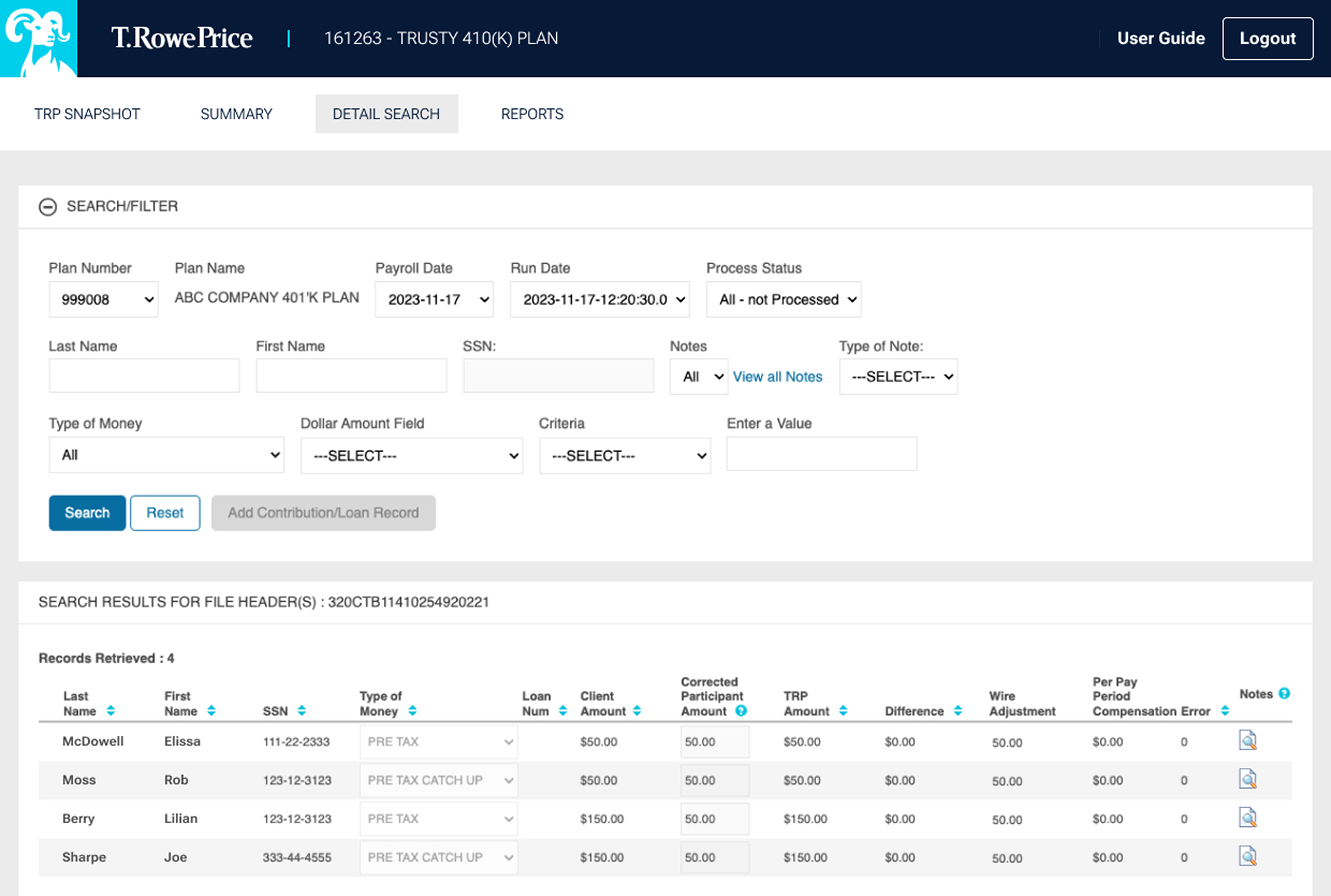
To make an adjustment or add notes of explanation
- Click the "Participant Detail" button on the Summary page OR navigate to the Detail Search tab.
- Ener first name, last name, SSN, or employee ID in the search section. you can also add filter sto your search, such as Type of Money or lcocation codes.
- Click "Search" and your results awill filter below.
To add a new contribution/loan record
- Enter a name or social security number to search for a participant, or leave this field blank.
- Click "Add Contribution/Loan Record."
- A new browser window will open.
- Enter the participants SSN, Name Type of Money, and correct amount.
- Click "Save: to oupdat the information.
Explore all the PVP tools designed to make your work easier.
202508-4721496